
USB-C hub vs. docking station: which one do you need based on your usage
Choosing between a USB-C hub and a docking station may seem complicated, but the decision becomes easier when you understand what each one is for. A USB-C hub is usually a compact solution for adding basic ports to a laptop. A docking station, on the other hand, is normally designed to turn your laptop into a more complete workstation. In this guide, you will learn their differences, when each option is best, what mistakes to avoid, and how to choose better according to how you work, study, play, or use external monitors.

USB-C hub vs docking station: main difference
The main difference is the level of connectivity you need. A USB-C hub is smaller, easy to carry, and useful for adding some extra ports such as HDMI, USB-A, USB-C, or a card reader. A docking station usually offers a more complete desktop experience, with more connections, better organization, and the ability to connect several accessories at the same time. Therefore, it is not about which one is better overall, but which one best suits your actual needs.
What problem does a USB-C hub solve
A USB-C hub helps when your laptop has few ports and you need a quick solution. For example, if you want to connect a monitor, a USB flash drive, a mouse, a keyboard, or charge your device while you work. It is a good option for students, people who move between home and the office, MacBook users, or thin laptops that no longer come with as many physical ports. It is also practical when you need something lightweight and easy to store in your backpack.
- It is more portable and easy to carry.
- It is used to add essential ports.
- It is ideal if you do not need a very complete fixed desk setup.
Simple Tech recommendation: if you only need to connect a few accessories and move around easily, a compact USB-C hub may be enough. If your laptop is almost always at a desk with a monitor, keyboard, mouse, and several peripherals, a docking station can give you a more convenient experience.
What is a USB-C hub and when is it right for you
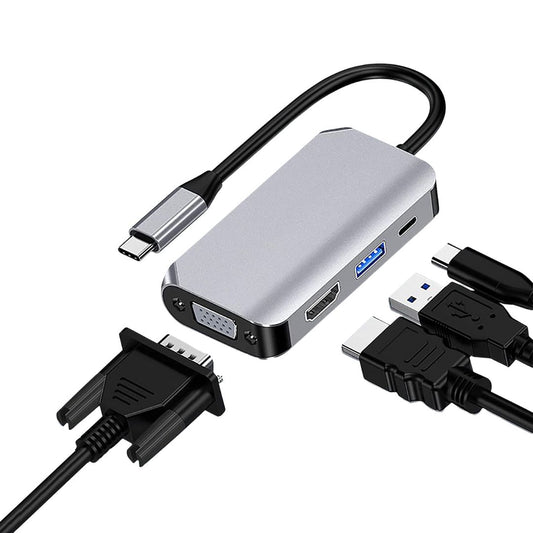
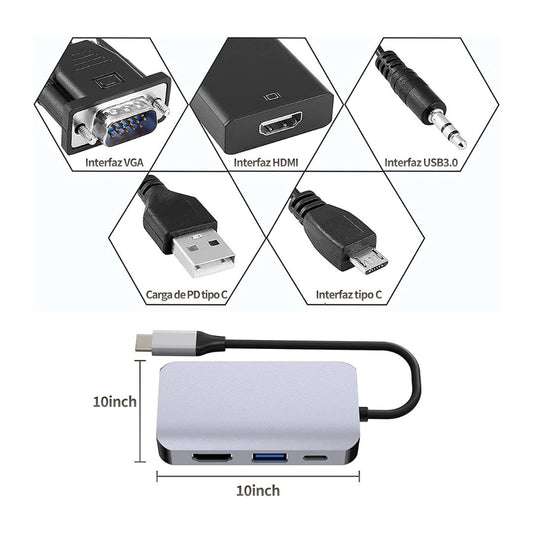
A USB-C hub is a multi-port adapter that connects to your laptop to give you more connection options. It can help you connect screens, flash drives, peripherals, or chargers depending on the model. In our collection of USB-C hubs, OTGs, and laptop adapters, you can find several options to improve connectivity without complicating your setup. The key is to check which ports each hub has and if your laptop is compatible with the functions you need.


When to choose a compact hub
Choose a compact hub if you need a practical solution for everyday use. For example, the ORICO Type-C 5-in-1 Hub can be an interesting option for users who need HDMI, USB ports, and Power Delivery charging in a portable format. This type of product works well when your priority is to have more connectivity without carrying a large accessory.
When to choose a video hub
If your main need is to connect screens, you should pay attention to the video outputs. Not all hubs have the same type of output or the same compatibility. If you work with two HDMI screens, you can check an option like the USB-C to Dual HDMI Hub. If your monitor uses DisplayPort, it may make more sense to check a USB-C hub with DisplayPort.
What is a docking station and when is it right for you
A docking station is a more complete connection station. It is designed for people who use their laptop as their main computer and want to connect several devices at the same time. It can help you have a monitor, keyboard, mouse, wired network, flash drives, charger, and other accessories connected from a single point. This is very useful when you work many hours at the same desk and want to avoid connecting and disconnecting several cables every day.
| Option | Advantage | Ideal for |
|---|---|---|
| Compact USB-C hub | Adds essential ports without taking up much space. | Students, travel, meetings, and mobile use. |
| USB-C hub for video | Allows connecting external monitors depending on compatibility. | Users who need HDMI, DisplayPort, or dual screens. |
| Docking station | Centralizes more connections at a fixed desk. | Office, home office, productivity, and complete setups. |
Common mistakes when choosing between a USB-C hub and a docking station
The most common mistake is buying based on the number of ports without thinking about the actual use. Many people see an adapter with several inputs and think it will solve everything, but that is not always the case. It is also common to buy a hub thinking it will work the same as a docking station, or to buy a docking station when you only needed something portable. To choose well, first define what you are going to connect and then check if the product has the correct ports.
- Buying a hub just because it has many ports, without checking if those ports are the ones you really need.
- Not checking if your laptop's USB-C supports video, charging, or data transfer depending on the use you want to give it.
- Choosing a small solution for a desk that needs many accessories connected all day.
- Buying a complete docking station when you only need to connect a monitor or a USB flash drive occasionally.
- Not checking if your monitors use HDMI, DisplayPort, VGA, or another type of input.

Which option to choose according to your type of use
Not all users need the same solution. A person who works from a coffee shop may need something small. An office may need a more stable station. A gamer may prioritize screens and accessories. A person who works from home may want organization, charging, a monitor, and peripherals connected simply. That is why the best purchase depends on your routine, not just the product.
For office and home office
If you work every day from a desk, a docking station is usually more convenient. An option like the ORICO Type C 8-in-1 Docking Station can help you when you need to connect a screen, USB, network, cards, and charging from the same device. This reduces clutter and allows your laptop to function as a more complete workstation.
For more complete setups
If you use many accessories or want a more robust solution, an alternative like the ORICO Type C 11-in-1 Docking Station may be more suitable. This type of docking is designed for those who need more ports and a more organized connection to work with files, screens, network, audio, and peripherals from a single point.
For users who move around a lot
If you take your laptop to meetings, classes, the office, home, or travel, a compact USB-C hub can be more convenient. It takes up less space and allows you to solve common needs without carrying a large station. For this profile, it is best to choose a hub with the ports you use the most: HDMI if you connect a screen, USB-A if you use flash drives or peripherals, and USB-C if you need charging or an additional connection.
To connect external monitors
If your priority is working with screens, first check what connection your monitor has. To better understand this point, you can read our guide to connecting two monitors to a laptop. That decision will also help you know if you need a hub with HDMI, a hub with DisplayPort, a docking station, or a more specific adapter.
Don't buy the adapter with the most ports; buy the one that best solves your actual way of working.
How to decide without getting confused
To decide between USB-C hub vs docking station, make a simple list of what you are going to connect. If you only need one screen, a flash drive, and maybe charge your laptop, a hub may be enough. If you need a monitor, keyboard, mouse, network, audio, cards, charging, and several devices at the same time, a docking station can be a better investment. If you are still in the stage of understanding which ports to look for, you can also check our guide to choosing the best USB-C hub for your laptop.
Products and related guides to keep learning
If you are improving the connectivity of your laptop, you can start with a simple solution or move toward a more complete station depending on your need. The important thing is that each accessory has a clear function within your setup: connect screens, charge, transfer data, use peripherals, or keep your desk more organized.
- USB-C Hubs, OTGs, and laptop adapters
- ORICO Type-C 5-in-1 Hub for portable connectivity
- ORICO Type C 8-in-1 Docking Station for work desk
- ORICO Type C 11-in-1 Docking Station for more complete setups
- Guide to choosing the best USB-C hub for your laptop

Frequently asked questions
What is better, a USB-C hub or a docking station?
It depends on your use. A USB-C hub is better if you need something portable to add some ports. A docking station is better if you work at a fixed desk and want to connect a monitor, keyboard, mouse, network, charger, and other accessories in a more organized way.
Is a USB-C hub useful for connecting monitors?
Yes, but only if the hub has a video output and your laptop allows sending an image through that port. Some hubs have HDMI, DisplayPort, or VGA, but compatibility also depends on the laptop. Before buying, check if your USB-C supports video output.
Does a docking station replace all adapters?
It can replace several adapters if it has the ports you need. For example, it can gather video, USB, network, charging, audio, or card reader in a single device. Even so, you must check which connections you really use so as not to buy a more complete option than necessary.
Do I need a docking station if I only use one monitor?
Not always. If you only connect one monitor and one or two accessories, a USB-C hub may be enough. A docking station makes more sense when you use several peripherals every day or want to leave your desk connected in a fixed way.
What should I check before buying a USB-C hub?
Check which ports you need, if your laptop supports video via USB-C, what input your monitor has, if you need Power Delivery charging, and if you will use USB peripherals. Buying based on your actual use avoids choosing an adapter that does not solve your problem.
Which option is best for working from home?
For working from home, a docking station can be more convenient if you have a monitor, keyboard, mouse, charger, and other accessories connected almost all day. If you work in different places and need mobility, a compact USB-C hub can be more practical.
Conclusion
The comparison between USB-C hub vs docking station does not have a single answer for everyone. If you are looking for something small, portable, and functional for basic tasks, a USB-C hub can solve your need very well. If you want a more complete desk, with several accessories connected and fewer loose cables, a docking station can be a better choice. Before buying, think about what you are going to connect, where you are going to work, and how fixed your setup will be.
At Simple Tech Nicaragua, you can find original and compatible accessories to improve your setup without complications.
Productos recomendados
Opciones seleccionadas por Simple Tech para complementar esta guía y ayudarte a elegir mejor.


Mejora tu setup sin complicaciones
En Simple Tech Nicaragua puedes encontrar accesorios originales y compatibles para trabajar, estudiar, crear contenido o conectar mejor tus dispositivos.



Deja tu comentario
¿Tienes una duda, experiencia o recomendación? Compártela aquí.