


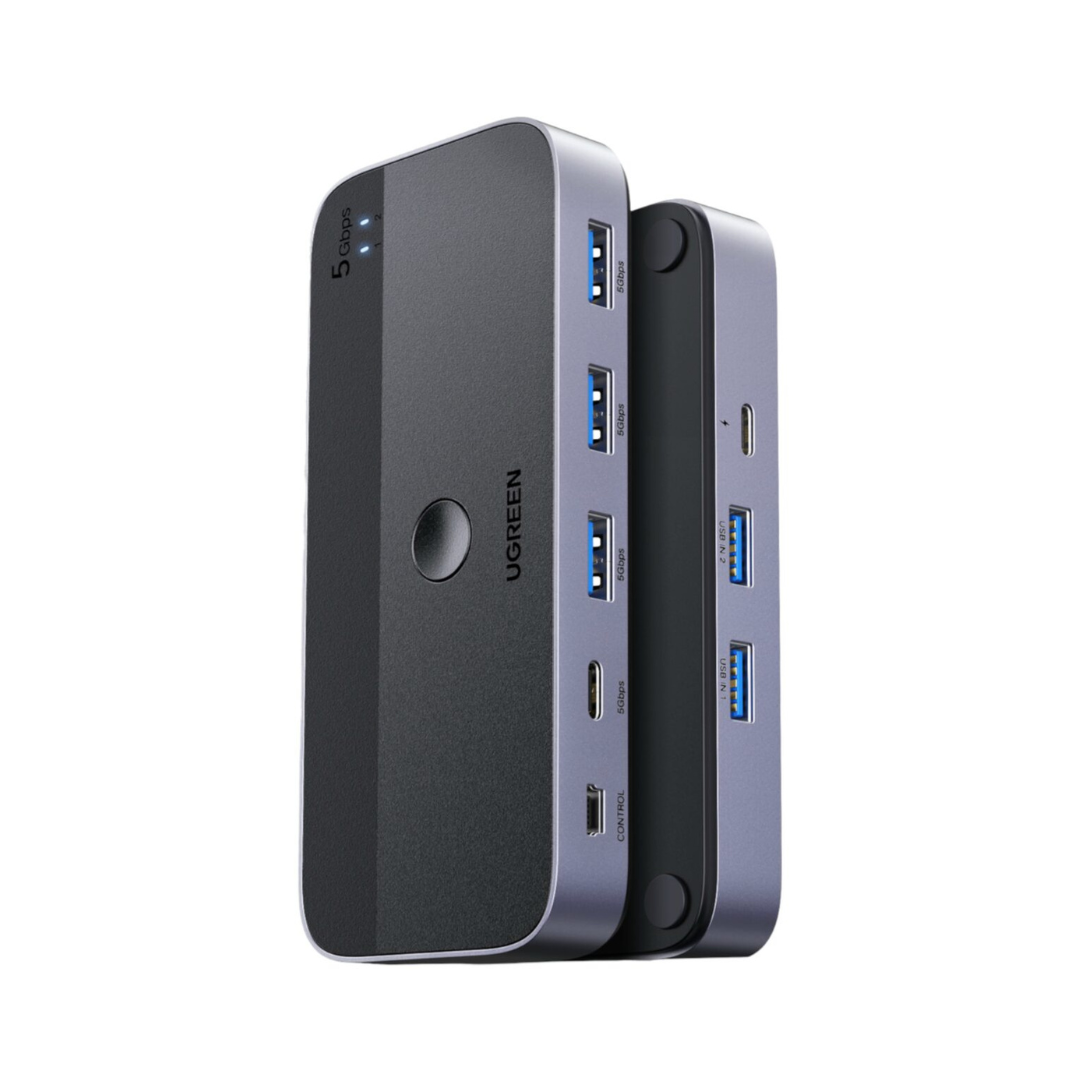
UGREEN USB 3.0 Switch to share 4 peripherals between 2 computers with fast switching and stable connection
Better organize your workspace and avoid constantly connecting and disconnecting peripherals. This UGREEN USB 3.0 switch allows two computers to share up to 4 USB devices, such as a keyboard, mouse, webcam, printer, or USB flash drive, with quick switching via button or remote control.
Benefits
- Allows the use of the same keyboard, mouse, printer, or webcam on two computers.
- Reduces desktop clutter and simplifies switching between personal and work computers.
- Offers data transfer speeds of up to 5Gbps for faster file movement.
- Includes a remote control to switch computers without having the switch within reach.
- Its plug-and-play design facilitates installation without complicated configurations.

Features
- 2-in-4 design to share up to 4 USB devices between two computers.
- Includes 1 USB-C port and 3 USB-A ports for connecting compatible peripherals.
- USB 3.0 transfer speed of up to 5Gbps.
- Backward compatible with USB 2.0 devices.
- Device switching via physical button or desktop remote control.
- Optional USB-C power port for improved stability when using multiple accessories or higher-power devices.
- Metal-finished body for better heat dissipation.
- Compatible with Windows, macOS, Chrome OS, and Linux.
Ideal for
- Offices and home offices with a laptop and a desktop PC.
- Users who share a printer or scanner between two computers.
- Desktops where the goal is to work with fewer cables and more order.
- People who use a keyboard, mouse, webcam, or USB flash drive on more than one computer.
- Spaces where the switch is hidden, and remote control switching is needed.
Comparison
- Traditional hub or direct connection: requires connecting and disconnecting peripherals every time you switch computers.
- UGREEN USB 3.0 Switch: allows sharing up to 4 peripherals between 2 computers with quick and more convenient switching.
- Basic solution without a selector: often creates more desktop clutter and wasted time when switching accessories.
- UGREEN USB 3.0 Switch: helps maintain a cleaner, tidier, and more functional workspace.
- Simple adapters or old switches: may offer slower transfer speeds for modern files and peripherals.
- UGREEN USB 3.0 Switch: achieves up to 5Gbps for working faster with USB flash drives, disks, and compatible accessories.
- Models without remote control: require the device to be within reach to switch between computers.
- UGREEN USB 3.0 Switch: includes a physical button and remote control for easier device switching.
- More limited switches: do not always combine USB-C and USB-A ports in the same solution.
- UGREEN USB 3.0 Switch: integrates 1 USB-C port and 3 USB-A ports to better adapt to current and traditional peripherals.
- Direct connection of peripherals to two computers: normally requires duplicating accessories or manually moving them from one device to another.
- UGREEN USB 3.0 Switch: allows you to work with the same keyboard, mouse, webcam, or printer on two computers without complications.
Specifications
- Type: USB 3.0 switch with 2 inputs and 4 shared outputs.
- Peripheral ports: 1 USB-C and 3 USB-A.
- Maximum transfer speed: up to 5Gbps.
- Compatibility: Windows, macOS, Chrome OS, and Linux.
- Switching modes: physical button and remote control.
- Additional power: optional USB-C port.
- Main use: data transfer and connection of USB peripherals.
- Approximate switch dimensions: 4.8 x 2.1 x 0.7 inches.
Reasons to choose
- Helps you work with two computers without duplicating peripherals.
- Combines USB-A and USB-C ports to better adapt to current and traditional accessories.
- The remote control provides more convenience when the switch is under or behind the desk.
- Its 5Gbps speed is ideal for everyday peripherals and files.
- It is a practical solution for cleaner, tidier, and more functional desks.
CTA
Make your workspace more comfortable, organized, and efficient with a single switch for your essential peripherals.
Switch between two computers in seconds and keep your keyboard, mouse, printer, or webcam always ready to work.
Guided tour — 06 PUNTOS
Product Infographic
Click each bullet point to explore the most important product details.


01 / 06
Plug-and-play
Start using it without installing drivers. Just connect your equipment and peripherals to quickly switch between two computers.
Resolve your doubts
Frequently asked questions
Find quick answers about this product here.
Does this switch allow sharing a monitor between two computers?
What devices can I connect to this switch?
Do I need to install drivers or software?
What is the USB-C power port used for?
Can I use it with a laptop that only has USB-C ports?
Does it charge phones or tablets?
-

Secure Payment and Cash on Delivery
-

Premium Accessories
-

Shipping to all of Nicaragua
-

15-Day Guarantee


-
Secure Payment and Cash on Delivery
-
Premium Accessories
-
Shipping to all of Nicaragua
-
15-Day Guarantee