
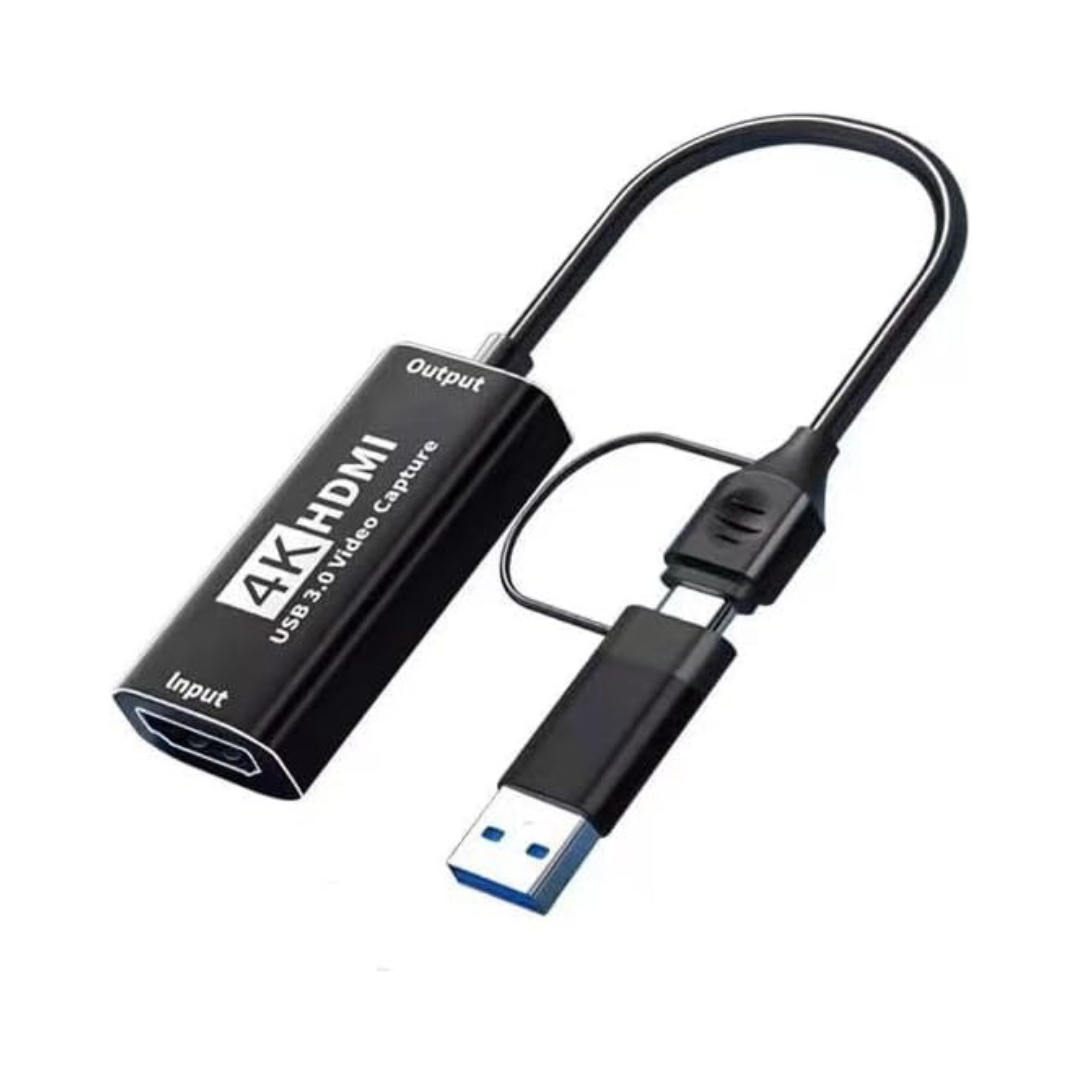
4K HDMI USB and USB-C Video Capture Card
This compact capture card converts an HDMI signal from a camera, console, or computer into a USB video source for recording, streaming, or participating in a video call. The built-in cable ends in USB-A 3.0 and includes a USB-C adapter, so it can connect to different host devices without needing another converter. It supports an advertised HDMI input of up to 4K and delivers Full HD capture of up to 1080p at 60 frames per second in compatible configurations. Its plug-and-play operation simplifies use with applications such as OBS, meeting platforms, and USB camera programs. It does not include an HDMI pass-through output or separate microphone and headphone jacks; it is designed as a direct HDMI-to-USB solution. For stability, use a high-speed port and configure the correct format within the software.
Benefits

- Convert an HDMI camera or console into a USB video source.
- Capture up to 1080p at 60 FPS on compatible devices and programs.
- Choose USB-A 3.0 or USB-C using the built-in adapter.
- Stream without installing an internal card in the computer.
- Carry the capture card in a backpack or small case.
- Use it for streaming, classes, meetings, and recordings.
Features

- HDMI input for compatible video sources.
- USB-A 3.0 connection with built-in USB-C adapter.
- Advertised input up to 4K at 60 Hz.
- Advertised capture output up to 1080p at 60 Hz.
- Plug-and-play design with no external power supply.
- Compact metal alloy housing.
Ideal for

- Cameras with clean HDMI output.
- Video game consoles for streaming.
- Virtual classes with a dedicated camera.
- Meetings on Zoom, Teams, or other compatible platforms.
- Recording demonstrations and presentations.
- Creators who need a portable capture card.
Comparison

- Common alternative: a webcam limits the image to its built-in lens.
- This product: allows you to use a compatible HDMI source as a USB camera.
- Common alternative: a USB-A model does not connect directly to USB-C ports.
- This product: includes both connection formats for the device.
- Common alternative: an internal card requires opening the computer.
- This product: installs externally via plug-and-play.
- Common alternative: low-frame-rate capture results in less fluidity.
- This product: supports up to 1080p at 60 FPS under compatible conditions.
- Common alternative: a large solution takes up more production space.
- This product: the compact format fits alongside essential cabling.
Specifications

- Type: HDMI to USB capture card
- Input: HDMI
- Advertised input resolution: up to 4K at 60 Hz
- Advertised capture resolution: up to 1080p at 60 Hz
- Main interface: USB-A 3.0
- Built-in adapter: USB-C
- Installation: plug-and-play
- Power: from the USB port
- Housing: metal alloy
- Use: recording, streaming, and video calls
Reasons to choose

- Combines USB-A and USB-C in the same cable.
- Captures Full HD with smooth motion.
- Does not require a separate power source.
- Is recognized as a video device in compatible software.
- Its size makes it easy to move between devices.
- Provides a direct HDMI-to-USB solution.
CTA
Choose the 4K HDMI USB and USB-C Video Capture Card to meet this need with a practical and well-organized solution.
Add it to your cart and get your equipment ready to use from day one.
Frequently asked questions about this product
Does it really capture in 4K?
The input accepts an advertised signal of up to 4K, but capture to the computer is advertised up to 1080p at 60 FPS. Input and recorded resolution are different data points. The final output also depends on the source, the USB port, the system, and the program settings.
Can I connect it to USB-C?
Yes. The cable ends in USB-A 3.0 and includes a built-in USB-C adapter. Choose the connector that corresponds to the host device and use only one at a time. The port must support data; a USB-C connector dedicated solely to charging will not work for receiving video.
Does it need external power?
It does not use a separate power adapter; it receives power from the host device's USB port. To avoid disconnections, connect it directly to a stable port with an appropriate speed. If you use a hub, make sure it can supply sufficient data and power. Before using it, check compatibility, the condition of the connectors, and the instructions of the main device.
Does it work with OBS and video calls?
It can appear as a USB camera in compatible programs, including streaming and video call software. Within the application, you must select the capture card as the video source and, if applicable, the audio source. Adjust the resolution and frame rate before starting an important session. Before using it, check compatibility, the condition of the connectors, and the instructions of the main device.
Does it have an HDMI output for a monitor?
No. This compact model is designed as an HDMI-to-USB input and does not include an HDMI loop-out port. If you need to play on a monitor without relying on the program preview, choose a capture card that includes HDMI pass-through output. Before using it, check compatibility, the condition of the connectors, and the instructions of the main device.
What HDMI sources can be used?
It can work with cameras, consoles, and computers that deliver a compatible HDMI signal without protection that blocks capture. Use a suitable HDMI cable, configure an accepted resolution, and check that the source emits video before opening the recording program. Before using it, check compatibility, the condition of the connectors, and the instructions of the main device.
Guided tour — 06 PUNTOS
Product Infographic
Click each bullet point to explore the most important product details.


01 / 06
Connection compatibility
Receive HDMI video and choose USB-A or USB-C depending on the port available on your device.
Resolve your doubts
Frequently asked questions
Find quick answers about this product here.
Does it really capture in 4K?
Can I connect it via USB-C?
Does it need an external power supply?
Does it work with OBS and video calls?
Does it have an HDMI output for a monitor?
What HDMI sources can be used?
-

Secure Payment and Cash on Delivery
-

Premium Accessories
-

Shipping to all of Nicaragua
-

15-Day Guarantee


-
Secure Payment and Cash on Delivery
-
Premium Accessories
-
Shipping to all of Nicaragua
-
15-Day Guarantee